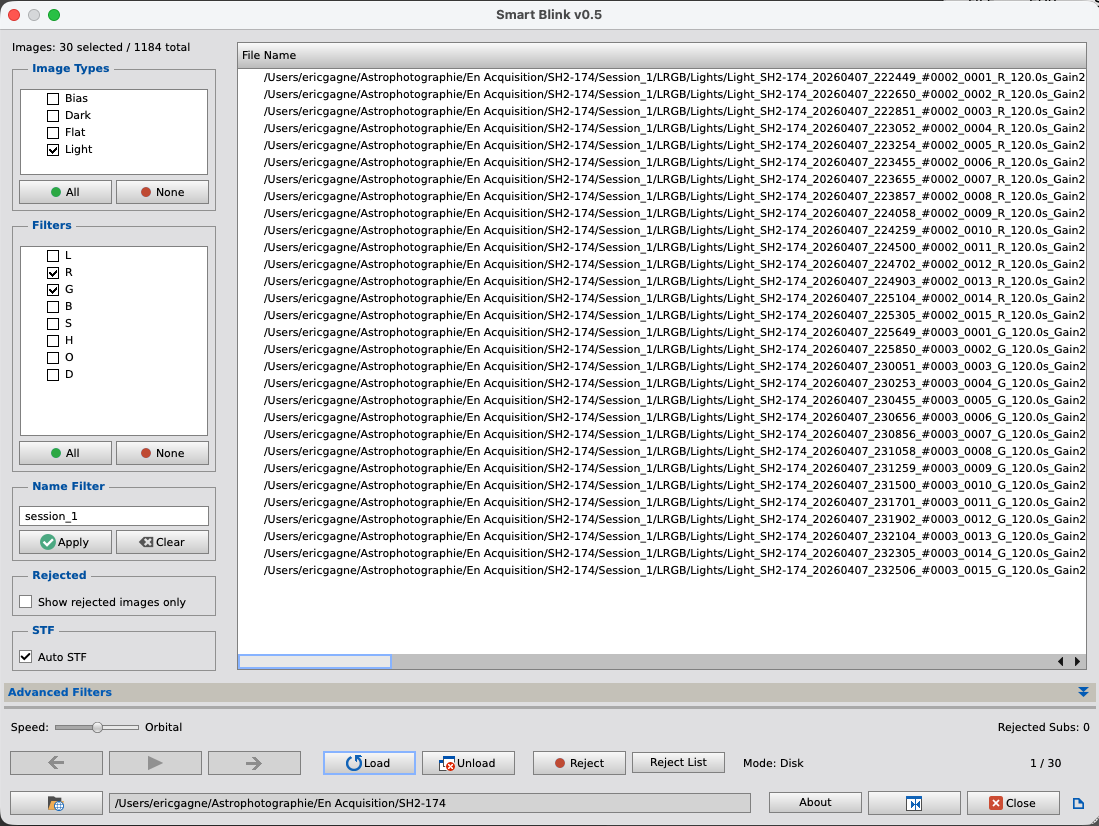
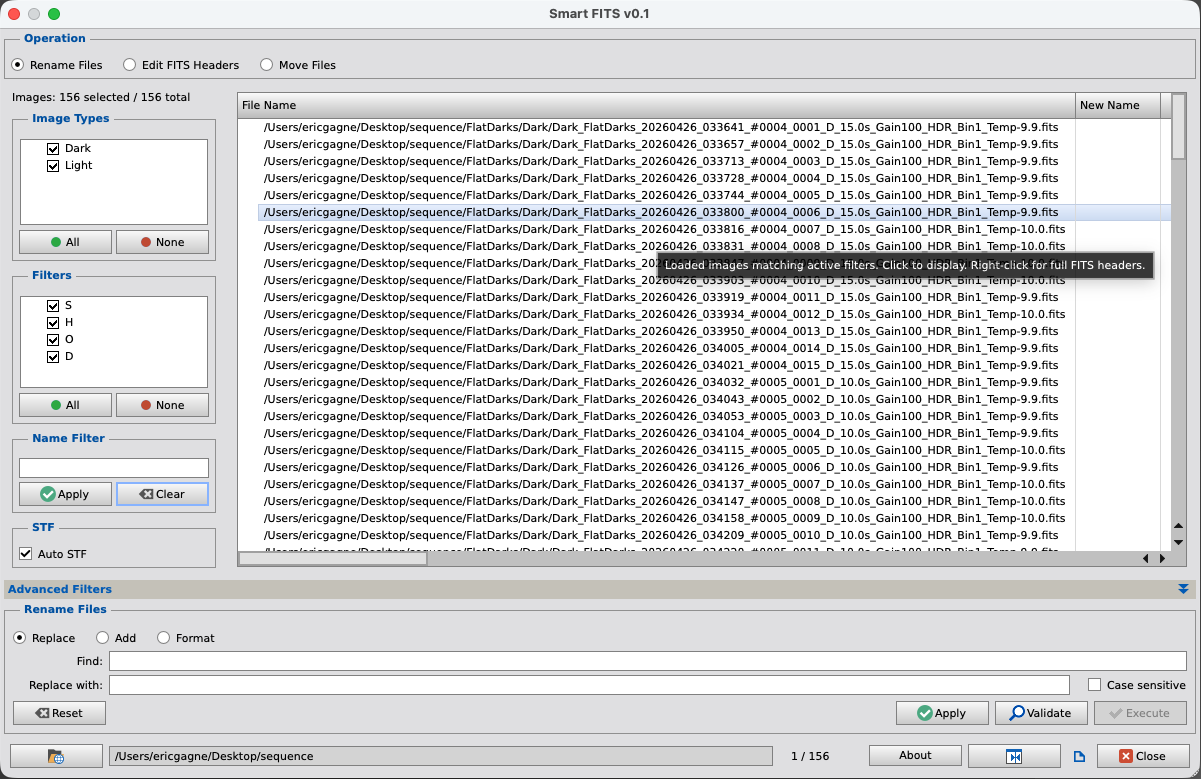
SmartBlink — Window size is now saved and restored between runs. Added the ability to select which FITS header values are displayed as columns in the file list.
SmartFITS — Window size is now saved and restored between runs.
PixInsight scripts for deep-sky image processing — with more on the way.
v1.0
PixInsight's built-in Blink tool is simple by design — you select files from your computer and it cycles through them, then you must unload, select a new set of images and so on. SmartBlink starts where Blink stops.
Point SmartBlink at any folder and it recursively scans it and all subfolders, finding every FITS and XISF files in them. It then reads the FITS headers of each file to extract image type (Light, Flat, Dark, Bias), filter name, and every other keyword present — giving you a fully indexed list of your frames before you review a single image.
From there, dynamic filters let you narrow the view to exactly what you want to inspect: only your Ha lights, only a specific exposure time, only frames matching any FITS keyword in your dataset. Filters update the list instantly without rescanning.
Images are loaded into a cache for smooth, fast playback. Navigation is frame-by-frame or continuous with adjustable blink speed. Each image is automatically displayed with a proper STF stretch so you're always looking at a well-exposed preview — no more black screens on uncalibrated raw frames.
As you review, frames can be flagged for rejection with a click on a button. The reject list accumulates across as you iterate through filtering and blinking. They list of rejected images can be copied to the clipboard, or acted upon directly — SmartBlink can physically move rejected files to a destination folder of your choice, preserving the original subfolder structure.
v1.0
SmartFITS is a file and metadata management utility for PixInsight. Scan an entire folder tree once, then rename files in bulk, edit FITS header keywords, or move files — all from a single interface, all with preview, validation and confirmation before anything is written to disk.
The script operates in three modes. In Rename mode, you can find and replace text in filenames, add a prefix or suffix, or build new filenames from scratch using a template system with placeholders drawn from FITS header values and fixed text you enter — for example, renaming an entire session's worth of files to a consistent format based on their actual metadata.
In FITS mode, you can edit header keywords in bulk across any selection of files: set a keyword to a new value, add a keyword that doesn't exist yet, delete a keyword, or rename one. Operations can be saved as named presets and reapplied in future sessions — useful for correcting recurring metadata issues from your capture software.
In Move mode, files can be relocated using a destination template, again with FITS keyword placeholders. This makes it easy to automatically sort a mixed folder of files into a structured hierarchy based on their actual content.
In all three modes, filters let you narrow the working set before applying any operation — by image type, filter name, filename fragment, or any FITS keyword with full operator support (=, ≠, >, <, contains). Every pending change is shown as a preview in the file list before you commit.
All Crepusculum scripts are distributed as a single package through PixInsight's built-in repository system.
Paste this URL into PixInsight's Resources > Updates > Manage Repositories
https://crepusculum.space/pixinsight/
In PixInsight, open Resources > Updates > Manage Repositories. Click Add, paste the URL from above, and click OK. Then go to Resources > Updates > Check for Updates — all available Crepusculum scripts will appear in the update list. Select them and click Apply.
Scripts and documentation are installed directly into PixInsight's script and documentation directories. Once installed, they appear in the Scripts menu under the Crepusculum group.
Future updates to existing scripts and any new scripts added to the package will be available through the same update mechanism — no need to revisit this page.
Current bugs and limitations, with workarounds where available.
No known issues at this time.
Planned improvements and upcoming additions. Order does not necessarily reflect priority or timeline.
Performance improvements for large datasets. Documentation improvements.
Addition of an image analysis tool — star count, FWHM, sky background, and other quality metrics to help make more informed reject decisions.
Documentation improvements.
Crepusculum was born out of a simple need — I wanted scripts that matched my own workflow. Rather than keep them to myself, I chose to distribute them freely to the PixInsight community, in the hope that other imagers might find them just as useful.
Crepusculum significat dubium — twilight means uncertainty.
— Marcus Terentius Varro, De Lingua LatinaThe name comes from the Latin word for twilight — that specific moment when the last traces of daylight fade and the deep sky becomes accessible. It felt like the right name for a collection of tools designed to help reveal what hides in the dark.
My name is Eric Gagné. I'm a French-Canadian software developer with 40 years of experience in ERP systems. I started astrophotography in 2023 and image from eastern Quebec, in the Bas-Saint-Laurent region — a mostly rural area with Bortle 5–6 skies, far enough from city light pollution to make deep-sky imaging genuinely rewarding.
The scripts at Crepusculum are the result of combining two passions — astrophotography and the creation of user interfaces that are pleasant to look at while being intuitive and easy to use. AI-assisted code generation handles the PJSR side of things, while each script reflects the same attention to workflow and usability that I've applied throughout my career as a developer.
For questions or help, feel free to send me a private message on Astrobin.
Map: Wikimedia Commons, CC BY-SA 3.0
Announcements, updates, and notes from the field.
Updates Update
SmartBlink — Window size is now saved and restored between runs. Added the ability to select which FITS header values are displayed as columns in the file list.
SmartFITS — Window size is now saved and restored between runs.
Scripts Release
SmartBlink and SmartFITS are now available. Head to the Download page for the repository URL and installation instructions.
Launch Announcement
Every site has a first day, and this is ours. Crepusculum launched today — a home for the PixInsight scripts I've been building for my own workflow, now distributed freely to anyone who might find them useful.
The name comes from the Latin word for twilight — that specific moment every astrophotographer waits for, when the last traces of daylight fade and the deep sky becomes accessible. It felt like the right name.
Scripts Coming Soon
Two scripts are nearly ready for release. SmartBlink is an enhanced replacement for PixInsight's built-in Blink tool — scan an entire folder tree once, then blink any subset instantly by applying filters. SmartFITS is a file and metadata management utility — bulk rename, edit FITS keywords, and move files, all with a preview before anything is written to disk. Both are in final testing. Stay tuned.